Resize Image Online Free
Change the width and height of JPG, PNG, WebP, GIF and SVG images, one at a time or in a batch, by pixels, percentage or print size.
A photo resizer for JPG, PNG, GIF and SVG
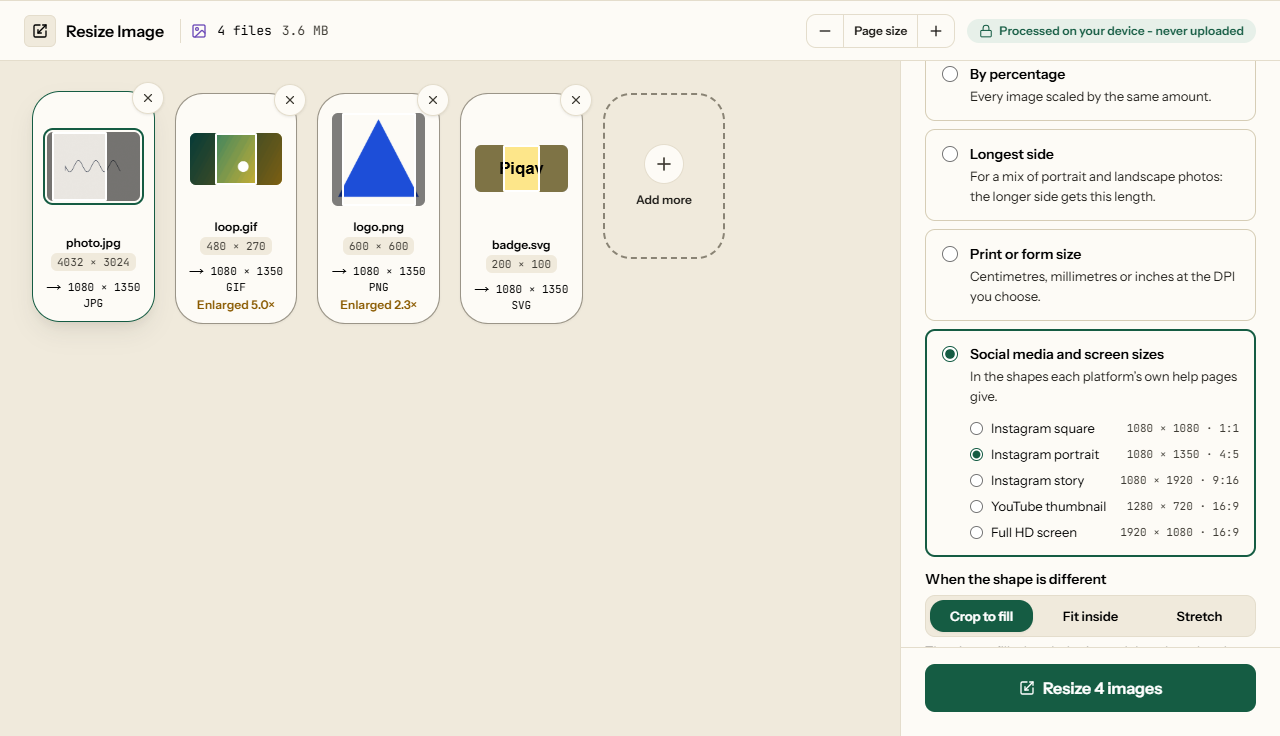
This image resizer changes the width and height of one photo or a whole batch: by pixels, by percentage, by the longest side, by a print size in centimetres or inches, or to a social media size. Every image keeps its own format unless you choose another. Animated GIFs keep every frame, and SVGs can stay SVG. Before you start, each image shows the size it will come out at, and any image that would be enlarged is marked. iPhone photos (HEIC) are turned into JPGs as you add them. Your images are resized in this browser tab and never uploaded.
Resize an image in pixels, percent or cm
There are five ways to set the size, and each one can scale an image down or up:
| Width and height | In pixels. With Keep proportions on, type one side and the other follows each image's shape; off, every image comes out exactly that size. |
| By percentage | Every image scaled by the same amount: 50% of a 4032 × 3024 photo is 2016 × 1512. |
| Longest side | For a mix of portrait and landscape photos: the longer side of each gets this length. |
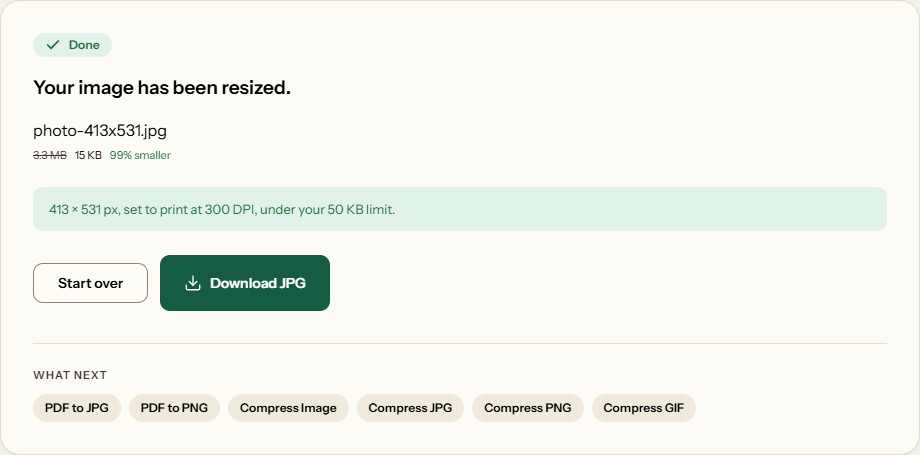
| Print or form size | Centimetres, millimetres or inches at a DPI you choose, so it works as a photo size converter: 3.5 × 4.5 cm at 300 DPI is 413 × 531 pixels. |
| Social media and screen sizes | Instagram square (1080 × 1080), portrait (1080 × 1350) and story (1080 × 1920), a YouTube thumbnail (1280 × 720) and Full HD (1920 × 1080), in the shapes Instagram's, Meta's and YouTube's own help pages give, checked on 28 October 2026. |
When the shape is different: crop, fit or stretch
A landscape photo cannot become a 1080 × 1350 portrait without giving something up, so for a fixed size you choose what:
- Crop to fill fills the whole size and cuts off what does not fit. Each image shows a frame over the part that will be kept; drag it, or move it with the arrow keys, so the cut misses the face or the text.
- Fit inside keeps the whole picture and fills the space around it with white, with nothing (in PNG, WebP, GIF and SVG), or with a blurred copy of the picture itself.
- Stretch squeezes the picture to the exact size, so circles and faces change shape. It is there for the rare case that needs it.
Bulk resize: many photos in one ZIP
Add as many images as you like, in any mix of formats, and they are resized with the same settings and downloaded as one ZIP. Each file is named with its new size, such as photo-1080x1350.jpg, so a folder of resized photos stays easy to sort. Crop frames are set per image, so in a bulk resize each photo can keep a different part of the picture. Your settings are remembered in this browser for the next batch.
Passport photos and resizing an image in KB
Application forms usually ask for two things at once: a size in centimetres or pixels, and a file size limit. Set both in one go. Choose Print or form size, pick a size, and tick Keep each file under a size. The pixel size stays exactly as set and the quality is lowered until the file fits. That limit works with every way of setting the size, so you can resize an image to 20 KB, 50 KB or any size in KB at the dimensions you chose.
On 28 October 2026 a 12-megapixel phone photo (4032 × 3024, 3.4 MB) came out at 413 × 531 pixels and 15 KB for a 50 KB limit, at the starting quality of 90. The DPI is written into the JPG or PNG file itself - we read it back as 300 - so a print dialog prints it at 3.5 × 4.5 cm rather than guessing. Requirements differ between forms, so check the size, background and limit in your form's own instructions.
Measured results
Run in Microsoft Edge 156 on 28 October 2026, with the tool's own code, and each output read back and checked. The animation is a 30-frame, 320 × 200 GIF.
| Image | Resized to | File size | Time |
|---|---|---|---|
| 12 MP photo, 3.4 MB | 1080 × 810 JPG | 68 KB | 0.2 s |
| 12 MP photo, 3.4 MB | 50%, 2016 × 1512 JPG | 411 KB | 0.2 s |
| Animated GIF, 278 KB | 50%, 160 × 100, all 30 frames | 17 KB | 0.3 s |
| Animated GIF, 278 KB | 200%, 640 × 400, all 30 frames | 100 KB | 1.0 s |
| SVG, 230 bytes | 1000 × 500, still SVG | 259 bytes | - |
Every resized GIF kept each frame's timing and its loop count, with or without a transparent background. A phone photo stored sideways came out upright. Shrinking averages rather than skips pixels: lines one pixel wide, shrunk 13 times, came out an even grey. JPG, PNG and WebP images are redrawn, so location and camera details are not carried over.
How to resize an image in four steps
What Resize Image looks like
Two screens from the working tool, captured on 28 October 2026.
Frequently asked questions
Will resizing make my photo blurry?
Making it smaller, no: the pixels are averaged, not dropped. In our test, black and white lines one pixel wide, shrunk 13 times, came out an even grey to within half a level of 255, with no stripes. Making it larger adds pixels but no detail, so an image enlarged two or three times looks soft. The tool marks every image it would enlarge, and by default leaves smaller images at their own size.
How do I resize a photo to 3.5 × 4.5 cm?
Choose Print or form size, pick Passport 3.5 × 4.5 cm and leave the DPI at 300. That is 413 × 531 pixels. Choose Crop to fill and drag the frame over your face. If the form also has a file size limit, tick Keep each file under a size. Check the form's own instructions as well: portals differ in the size, the background and the DPI they ask for.
Why is my image the same size after resizing?
It was already smaller than the size you set, and Don't enlarge smaller images is on. Untick it to make the image bigger. The card under each image shows the size it will come out at before you start.
Does resizing a GIF keep the animation?
Yes, when you save it as the same format. Every frame is resized, and each frame's timing and the number of times it loops stay as they were. Saved as JPG, PNG or WebP, only the first frame is kept, and the tool says so.
What happens to an SVG?
Saved as the same format, it stays an SVG: only its width, height and visible area change, so it stays sharp at any size and the file hardly grows. Saved as PNG, JPG or WebP, it is drawn at exactly the size you set, so text and lines come out crisp. An SVG is never marked as enlarged, because enlarging a drawing loses nothing.
Does this change the image resolution?
Resolution means two different things. The pixel size, such as 4032 × 3024, is what every option here changes. The DPI is only an instruction to a printer and changes no pixels, so on screen it makes no difference. Print or form size sets both: 3.5 × 4.5 cm at 300 DPI gives 413 × 531 pixels and writes 300 DPI into the JPG or PNG, so it prints at that size.
Should I resize or compress?
Resize when the width and height are wrong: a form wants 413 × 531 pixels, or a 4000-pixel photo is going on a web page. Compress when the dimensions are fine and only the file is too big. Resizing often does both: our 3.4 MB, 4032 × 3024 photo resized to 1080 pixels wide came out at 68 KB.
Related Image Tools
When the file size, not the dimensions, is the problem.