Split PDF Online Free
A free PDF splitter and separator: divide one PDF into several, seven ways. Each page is copied as it is, on your device.
A PDF splitter that works without uploading
To split a PDF, open it in Piqav Split PDF, choose how to divide it, and click Split. The file is split on your device and never uploaded. You can separate PDF pages into their own files, cut a PDF into page ranges, pick single pages, make equal parts, keep each part under a file-size limit, cut scanned two-page spreads down the middle, or make one file per chapter from the bookmarks. Pages are copied, not re-rendered, so quality does not change.
| Input | One PDF at a time. A password-protected file is accepted once you type its password. |
|---|---|
| Output | One PDF, or a ZIP of several, named after the original plus the pages they hold, such as _page_3 or _range_1_3, or after the chapter. |
| Speed | 500 pages into single files in about 2 seconds; a 99 MB scan in about 3, on a mid-range laptop. |
| Limits | No fixed size or page count. The largest file we have tested is 99 MB and 120 pages. |
| Does not | Keep accessibility tags, page labels, attachments or the title; keep a digital signature valid; make a single page smaller; or split even and odd pages apart. |
How to split a PDF into separate PDFs
1-3, 5, a number of pages, or a size limit in KB or MB. The preview shows every file before you split.Seven ways to split, and when to use each
| Option | You type | You get | Use it for |
|---|---|---|---|
| Every page | Nothing | One PDF per page | Sending pages to different people |
| Page ranges | 1-3, 4-6 | One PDF per range, or one PDF of all of them with Put all ranges in one PDF | Cutting a document into known sections |
| Pick pages | 1, 3, 5, 7 or click the thumbnails | One PDF per page picked, or one PDF of them with Save the picked pages as one PDF | Pulling out a few pages, such as the passport page of a scan |
| Fixed number of pages | 10 | Parts of 10 pages; the last may be shorter | Batches of forms or invoices of the same length |
| By file size | 10 MB | As few parts as possible, each under 10 MB where the pages allow it | An upload form or email that caps each attachment |
| Cut pages in half | Left | Right or Top / Bottom | Two pages from every page, in reading order, in one PDF | A book or booklet scanned two pages at a time |
| By chapter | Nothing | One PDF per top-level bookmark, named after it | A report, manual or e-book with a table of contents |
The last three are under More ways to split. To unmerge a PDF that was combined from several files, split it by bookmarks or by page ranges. To put parts back together later, combine the PDF files into one. If you want each page as a picture rather than a PDF, save each page as an image instead.
Fit an upload limit: split by file size
By file size is for a portal that takes several attachments but caps each one - five files of 2 MB, say. It tries different page counts for each part, keeps the most pages that still come in under your limit, and moves on to the next part. On our six-page test scan, where each page is a 208 KB image, a 500 KB limit gave three parts of two pages, each about 416 KB.
What it cannot do is make a page smaller. Set the same scan to 150 KB and every part is one page of about 208 KB - over the limit, because no page fits under it on its own. The tool writes such a page out anyway rather than dropping it, so check the sizes before you upload. If single pages are too big, the answer is compression, not splitting: compress the PDF first, then split the smaller file. For an email rather than a portal, what fits under an email limit walks through both steps.
Scanned books and chapters
Cut pages in half
This is for a scan of a book or a booklet where each page of the PDF holds two pages of paper. It cuts where you see the middle, even on pages the scanner stored sideways and turned for display: we tested pages stored at all four rotations, both ways, and every half showed exactly the text a reader sees on that side. Each half is the original page with the other half hidden, so nothing is re-rendered and a scan loses no sharpness - our six-page scan came out at 1,275,537 bytes from 1,275,423, because both halves share one copy of each image. The hidden half is still in the file, so this is for splitting spreads, not for removing anything. Tick Keep the first page whole (a cover) if the scan starts with a single cover.
By chapter
This makes one file per chapter from a document's own table of contents. Each file runs from its bookmark's page to the page before the next, is named after the bookmark, and keeps the bookmarks inside it, so a chapter's sections are still listed. Pages before the first bookmark, like a cover or a contents page, get a file of their own; bookmarks listed out of order, or two on one page, still give one file per chapter. A PDF without bookmarks cannot be split this way - use Page ranges.
How big the parts are, and how fast
Splitting copies pages into new PDF files without re-rendering them, so quality does not change, but each file carries its own copy of the fonts its pages use. We timed the Split screen on 8 October 2026 in Microsoft Edge on a laptop with a Core i5-12450H and 16 GB of memory. Each time is the median of three runs, from clicking Split to the download being ready.
| Document | Split into | Time | Parts | Parts added together |
|---|---|---|---|---|
| 500-page text document, 2.39 MB | Every page | 2.1 s | 500 of 34.6 KB | 17.3 MB, 7.2 times the original |
| 500-page text document, 2.39 MB | 10 pages each | 1.0 s | 50 of 74.6 KB | 3.7 MB, 1.56 times |
| 120-page scan, 99.3 MB | Every page | 3.0 s | 120 of 828 KB | 99.4 MB, the same |
| 120-page scan, 99.3 MB | 10 pages each | 2.6 s | 12 of 8.3 MB | 99.3 MB, the same |
A text document embeds each font once and uses it on every page, so splitting it into single pages gives every page its own copy, and that copy is most of each file. A scan is different: each page is its own picture, there is little to share, and the parts add up to the original. So if the goal is smaller files, split a text document into as few parts as you can, and do not expect single pages to be tiny.
What each part keeps
| Part of the file | After splitting |
|---|---|
| Text, fonts and images | Kept unchanged; text is still selectable |
| Web links and comments | Kept |
| Filled-in form fields | Kept on the part's pages, still fillable |
| Bookmarks and links between pages | Kept where they lead to the part's own pages |
| A link to a page in another part | Stays on the page but goes nowhere, and cannot pull that page into the file |
| Digital signatures | No longer valid; the stamp stays on the page (see below) |
| Accessibility tags, page labels, attachments, the title | Dropped |
If you only want to remove some pages and keep everything else about the document, Delete Pages keeps tags and attachments, because it edits the original. The tests behind this table are in what survives each PDF tool.
Limit
What 'Also compress each part' does
It runs each part through our compressor, which turns every page into an image. The parts get much smaller, but text is no longer selectable or searchable, and links and form fields go. Use it for copies you are uploading somewhere with a size limit, not for files anyone needs to edit.
Splitting a digitally signed PDF (DSC)
Why no part can keep the signature
A digital signature, including the digital signature certificate (DSC) used for company and tax filings in India, is a seal over the exact bytes of the whole file it was applied to. A part is a new, smaller file, so the seal cannot match it, whichever tool does the splitting. Before we changed how Piqav handles this, splitting a signed three-page agreement gave a part that still showed its "Digitally signed by" stamp while the signature failed verification - a page that looks signed and is not.
What Piqav does
The stamp stays on the signature page as part of what you see, and the signature field that would fail is removed, so no part claims a check it cannot pass. We tested this on 30 September 2026 by splitting a signed agreement into single pages and into ranges with and without the signature page: only the parts holding that page carried the stamp, and none carried a signature field. Unlike Merge PDF, Split does not attach the signed original, because the original holds pages each part is meant to leave out.
What to send instead
If someone needs to check the signature, send the original signed PDF alongside the parts. If the part itself has to be signed, have it signed again with the certificate. Drawing a signature on the page is not the same thing; electronic and digital signatures explains the difference.
Check for yourself that nothing is uploaded
It takes about a minute in Chrome, Edge or Firefox:
- Open this page and press
F12(or right-click and choose Inspect), then open the Network tab. - Add your PDF, choose an option and click Split.
- Look at the requests that appear. Click any of them and open its Payload (or Request) tab: none carries your file.
We ran the same check with a script on 8 October 2026, splitting a 3.2 MB file and recording every request from the moment it was added. The page made three: one for the Split screen's own code and two for the PDF renderer. None of them sent any data. Google's ad scripts may load as well; check their requests the same way. The same test for seven other tools is in why browser-based PDF tools are safer.
What Split PDF looks like
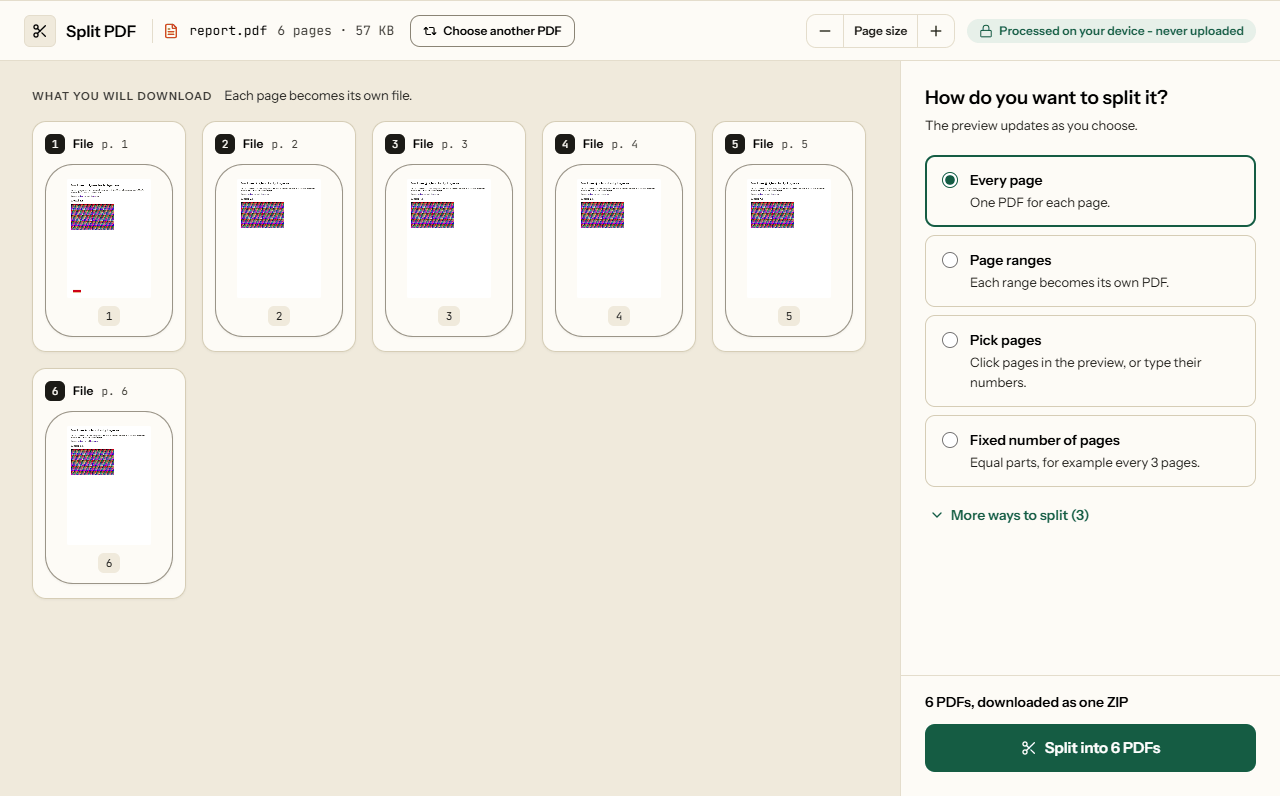
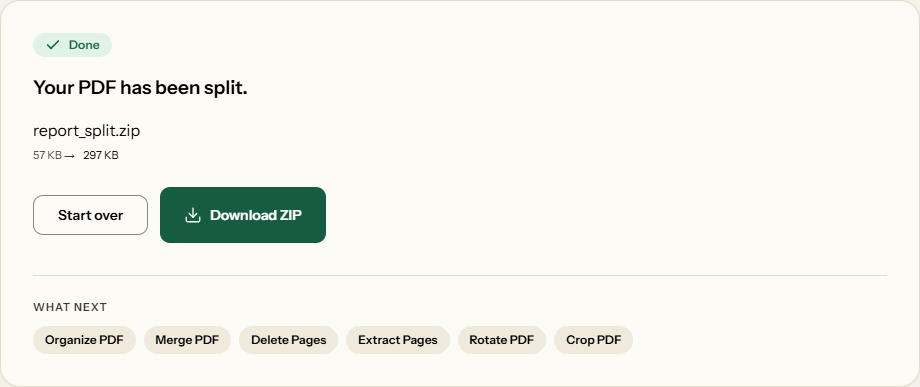
Two screens from the working tool, captured on 16 October 2026 with a 6-page, 57 KB report in it.
Frequently asked questions
Can I split a PDF into separate single-page files?
Yes. Choose Every page and each page becomes its own PDF, named with its page number; all of them download together in one ZIP. In our test, 500 pages split into 500 files in about two seconds. The files add up to more than the original, because each page carries its own copy of the fonts.
How do I split a PDF into files under a size limit?
Open More ways to split and choose By file size, then enter the limit in KB or MB. Each part gets as many pages as fit under it. Splitting cannot make a single page smaller: if one page is over the limit, it is still saved on its own, so compress the PDF first and then split it.
Can I split a PDF by chapters or bookmarks?
Yes, if the PDF has bookmarks. Choose By chapter and you get one file per top-level bookmark, named after it, with that chapter's own bookmarks kept inside. Pages before the first bookmark, such as a cover and contents, get a file of their own. A PDF without bookmarks cannot be split this way, so use Page ranges instead.
How do I split scanned pages in half?
Choose Cut pages in half, then Left | Right for a book scanned open, or Top / Bottom. Each sheet becomes two pages in reading order, even when the scanner stored it sideways. Tick Keep the first page whole for a single cover. The hidden half stays inside the file, so this is not a way to remove content.
Why are my split files bigger in total than the original?
Each part needs its own copy of the fonts its pages use. In our test, a 2.4 MB, 500-page text document split into single pages came to 17.3 MB in total, and into parts of ten pages to 3.7 MB. Scanned pages are different: a 99 MB scan split into single pages came to the same 99 MB.
Can I split a digitally signed PDF without losing the signature?
No. A digital signature, including an Indian DSC, covers the exact bytes of the whole original file, so no part can carry it validly. Piqav keeps the visible stamp on the page but removes the signature field, so no part claims a check it would fail. To prove the signature, send the original signed PDF with the parts.
Does splitting reduce the quality of my PDF?
No. Every page is copied into the new file exactly as it is, so text stays selectable and images keep their resolution. The one option that changes quality is Also compress each part, under By file size, which turns pages into images. Use it only for copies going to an upload portal, not for files anyone needs to edit.
Other Ways to Divide a PDF
Different approaches to the same problem.
Compress PDF
Shrink heavy PDFs so they fit inside email and upload limits.
Merge PDF
Combine several PDFs into a single document in the order you choose.
PDF to JPG
Turn each page into a JPG image for slides and sharing.
Extract Pages
Pull selected pages out into a brand new PDF.
Delete Pages
Remove blank scans, cover sheets, or pages you no longer need.
Organize PDF
Reorder, rotate, and delete pages in one visual workspace.