Unlock PDF Online Free
Enter the password once and save a copy that opens without it. If the file opens but won't print or copy, no password is needed.
Remove a password you already know
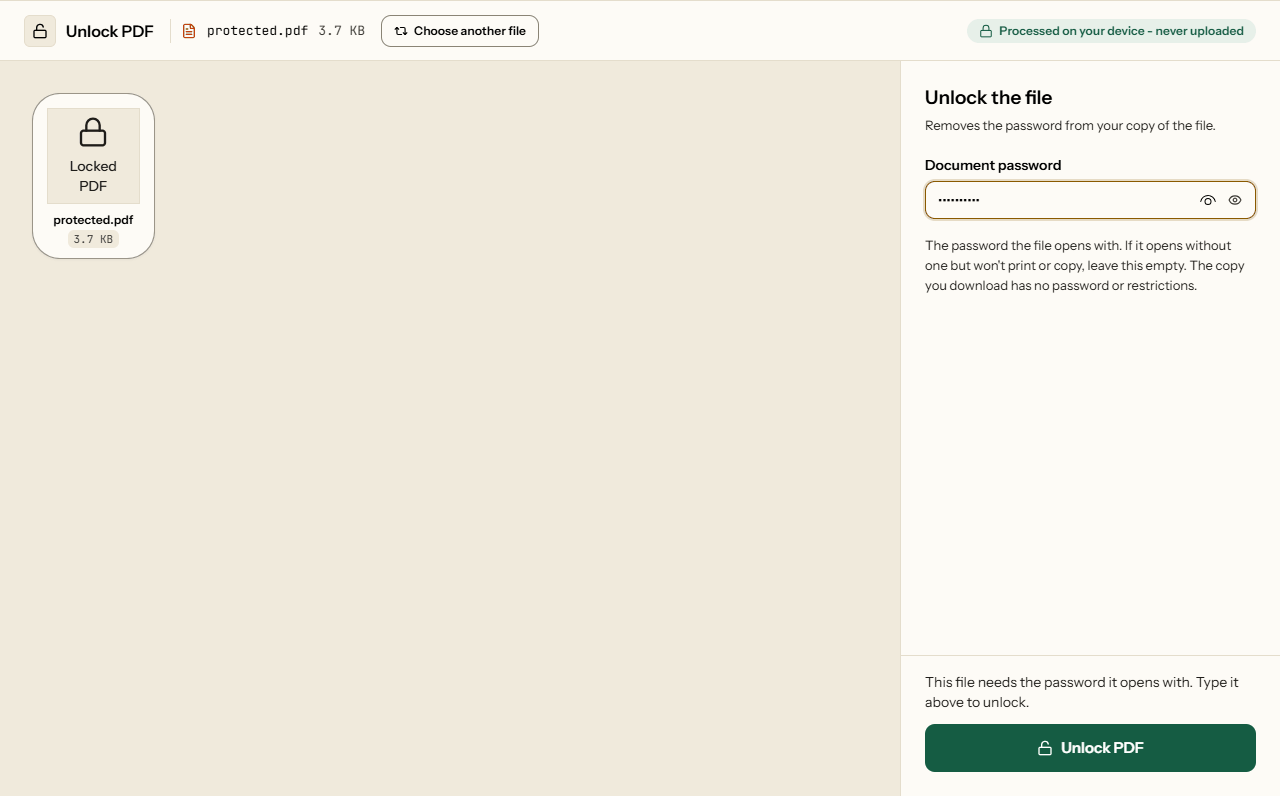
To unlock a PDF and remove its password, add the file, type the password it opens with, and click Unlock PDF. You get a copy with no encryption, so it opens in any reader without a prompt and can be printed, copied, merged or uploaded to portals that reject protected files. The password is used inside your browser and never sent anywhere.
Piqav cannot open a file whose password you don't know, and nor can any tool that is honest about what it does. The contents are encrypted with that password, and the only way in without it is guessing.
Two kinds of locked PDF
| What you see | What it is | What to type |
|---|---|---|
| Asks for a password before it opens | An open password: the contents are encrypted with it | That password. Without it, the file cannot be unlocked. |
| Opens, but printing or copying is greyed out | Restrictions only, set with a permissions password | Nothing. Leave the box empty. |
Restrictions are not enforced by encryption: the file opens for everyone, and readers merely agree to grey out some buttons. That is why Unlock can remove them without a password, and why our other tools (merge, split, sign and the rest) open such files without asking. A wrong password typed into the box is still refused rather than ignored, so leave it empty rather than guessing. Only unlock files you have the right to use. What each password really protects is explained in the two PDF passwords.
Statements, payslips and tax forms
In many countries, banks, card issuers, insurers and payroll systems send documents locked with a password you already know, such as part of your name, a date of birth or digits of an account number. The format is set by the sender and is usually stated in the email that carries the file. The lock is fine for the email and a nuisance afterwards: the file asks every time you open it, some upload portals reject encrypted PDFs, and tools that combine or compress PDFs cannot read a file that asks for a password.
Those passwords are also the weakest kind. A date of birth has about 36,500 possibilities, which a single graphics card tries in under a second (how long a PDF password lasts). Unlocking such a file gives up very little, but keep the unlocked copy somewhere private.
What the unlocked copy keeps
Everything except the encryption. Nothing is re-rendered or recompressed. Measured on 9 October 2026, on a desktop PC, unlocking files protected with Piqav's own Protect PDF:
| File | Original | Unlocked | Pages | Time |
|---|---|---|---|---|
| Text report | 58,003 bytes | 58,181 bytes | 6 of 6 | 0.2 s |
| Scan | 1,275,423 bytes | 1,275,549 bytes | 6 of 6 | 0.4 s |
| Pages with photos | 5,644,620 bytes | 5,644,770 bytes | 6 of 6 | 1.0 s |
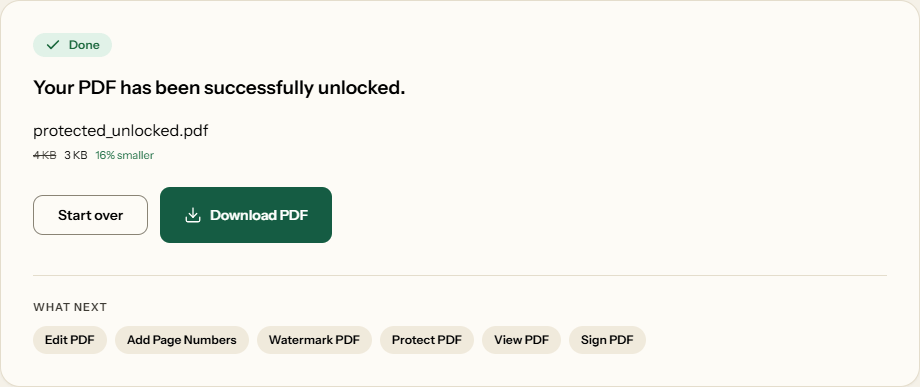
Bookmarks, links, accessibility tags, attachments and form answers survive too (the full test). The download keeps your file name with _unlocked added.
Tip
Unlocking for accessibility
PDF encryption can stop screen readers and other assistive technology from reaching the text. If you have been sent a protected PDF along with its password and your reader cannot get at the words, an unlocked copy removes that barrier.
How to unlock a PDF
What Unlock PDF looks like
Two screens from the working tool, captured on 16 October 2026 with a statement we locked with Protect PDF first in it.
Frequently asked questions
Can Piqav unlock a PDF if I forgot the password?
No. A PDF that asks for a password to open is encrypted with it, and Piqav does not try to guess passwords. Tools that claim to remove a forgotten password are guessing, which works only on short or predictable passwords. Ask whoever sent the file: banks and employers usually state the password format in the covering email.
My PDF opens but won't let me print or copy. Can I fix that?
Yes. Leave the password box empty and click Unlock PDF. A file that opens without asking has no open password, only restrictions, and the copy you download has none. In our test this took 0.2 seconds. Only do this with files you have the right to use, such as your own documents.
Will the unlocked file lose anything?
No. In our test the unlocked copies of a 58 KB report, a 1.3 MB scan and a 5.6 MB photo document came back within 200 bytes of the original size, with every page. Bookmarks, links, form answers and attachments also survive. Nothing is re-rendered or recompressed; only the encryption is removed.
Why does it say the password is incorrect when I'm sure it is right?
Passwords are exact. Check capital letters, a space copied by accident at either end, and the keyboard language; the eye icon shows what you typed. A file can also have two passwords, and Unlock needs the one the file opens with. If the file opens without asking, leave the box empty.
Does it work with passwords in other languages?
Yes. On 9 October 2026 we tested passwords written in Hindi, Chinese and accented Latin letters, and with spaces and quote marks. Each one unlocked the file it was set on, and the same password with one character added was refused. If the password came in an email, copy it from there rather than retyping it.
Should I keep the original encrypted copy?
Usually, yes. The unlocked copy has no protection for anyone it reaches later. If the document is still confidential, keep the encrypted version for sharing and use the unlocked one as your working copy. Delete it when you are done, especially on a shared computer.