PDF Viewer Online Free
Read, search and navigate a PDF in a fast continuous viewer, with no plugin and no download step.
Open a PDF and read it, nothing else
Open a PDF online without uploading it: Piqav's free PDF viewer shows it in your browser, with search, zoom, thumbnails, bookmarks and Document Properties. Drop in a file and it opens in a continuous viewer; closing the tab leaves nothing behind.
What is in the viewer
| Toolbar | Search, page number, zoom, dark theme, full screen, print and download |
| Sidebar | Page thumbnails, the document's bookmarks, and any attached files |
| More menu | Rotate the view, switch between scrolling and single pages or two-page spreads, and Document Properties |
It is a reader, not an editor: filled-in forms show their answers but cannot be typed into here, and rotating the view does not change the file. To change a document, use Edit PDF or Rotate PDF.
How fast a large PDF opens
It draws the pages you are looking at first rather than the whole document, so even a large file opens quickly. On 11 October 2026 we timed how long the first page took to appear after choosing the file, on our test machine, three times each:
- A 500-page text document, 2.3 MB: 0.66 seconds.
- A 120-page scan, 94.7 MB: 1.03 seconds.
Because the file is read from your disk rather than uploaded first, a bigger file does not mean a long wait before anything shows.
A quick check before you send a PDF
Because nothing is uploaded, the viewer is a safe place to look over a document that is about to leave your hands. Three things are worth a minute:
- Search for anything you removed. If you blacked out a name or number, search for it. A match means it is still in the file under the box - the most common way redactions fail. Redact PDF removes the covered text from the file instead.
- Open Document Properties. The title, author and the software that made the file are listed there, and they are often not what you would choose to send - an old template's title, a colleague's name. Our article on what PDFs leak in their metadata covers the rest.
- Look at the attachments tab. A PDF can carry other files inside it, and some tools attach them without saying so.
Password-protected and scanned files
A PDF that needs a password to open asks for it, and the password is only used in your browser. A scanned PDF opens like any other but its pages are pictures, so search finds nothing on them; OCR PDF reads the words off the images and gives you a searchable copy.
How to view a PDF
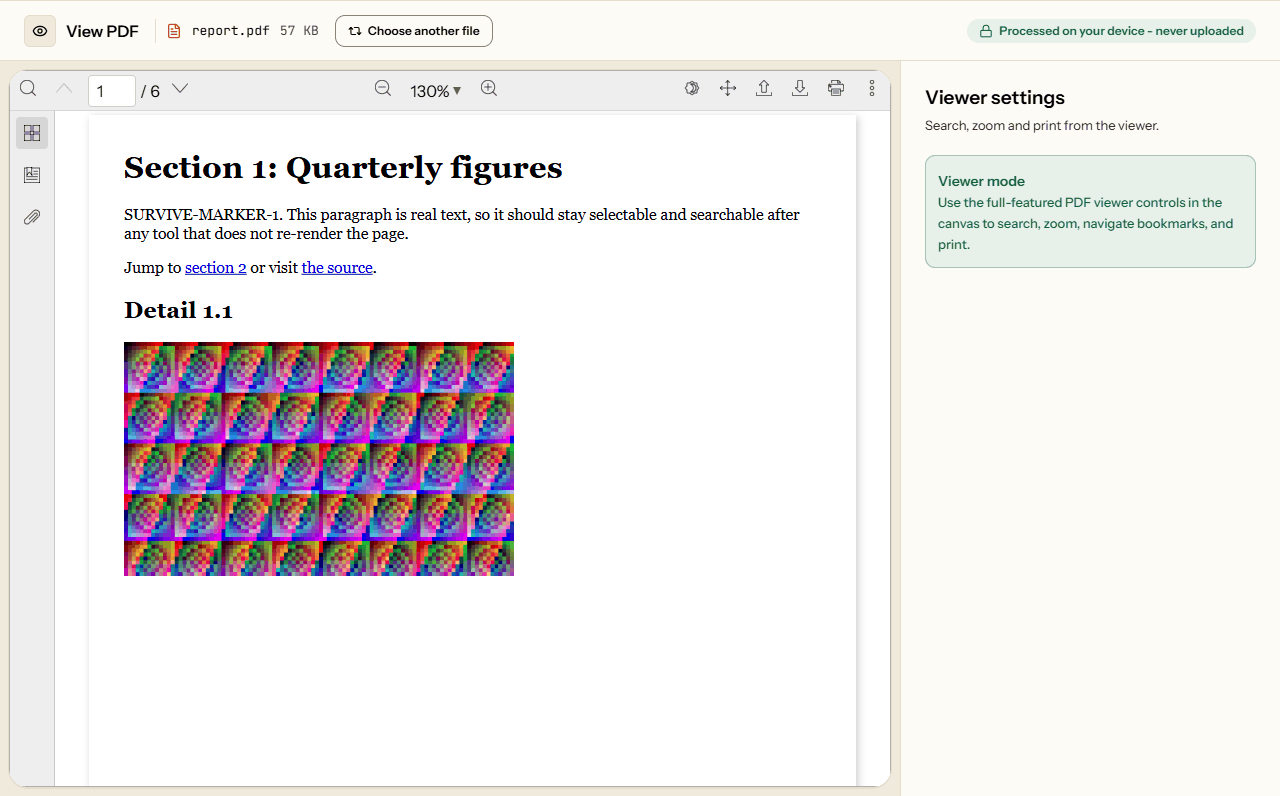
What View PDF looks like
The screen from the working tool, captured on 16 October 2026 with a 6-page, 57 KB report in it.
Frequently asked questions
Can I search for specific words in a large document?
Yes. Use the search button in the toolbar, or Ctrl+F, to find every match and step through them. Search only finds real text: in a scanned PDF the words are a picture, and OCR PDF can make them searchable.
Does this support PDF bookmarks and outlines?
Yes. If the document has bookmarks, the sidebar lists them and each one jumps to its page. The sidebar also shows page thumbnails and any files attached to the PDF.
Can I open more than one PDF at a time?
One per tab. To compare two documents, open the viewer in two tabs side by side, or merge the two PDFs into one file and read them as one.
Can I fill in a form or sign a PDF here?
Does it open scanned PDFs?
Yes, a scan opens like any other PDF. Its pages are pictures, though, so search finds nothing on them. To make the words searchable and copyable, run the file through OCR PDF first, then open the result here.
How do I check what a PDF reveals before I send it?
Search for anything you blacked out: a match means it is still in the file. Open Document Properties to see the title, author and the software that made it. Then look at the attachments tab, since a PDF can carry other files inside it.