Add Watermark to PDF Online Free
Stamp text or an image across every page, with a live preview of size, angle and opacity as you adjust them.
A word or a logo across your pages
To watermark a PDF, add the file, type a word such as CONFIDENTIAL or choose a PNG or JPG logo, and set its size, opacity and angle while every page previews the result. Put it once in the centre or repeat it across the page, on all pages or a list such as 1, 3, 5-7. The mark is drawn into each page in your browser, so the PDF is never uploaded. It prints, it cannot be switched off in a viewer, and it does not turn up in searches or copied text.
The controls
| Setting | Range | Starts at |
|---|---|---|
| Text size | 8 to 200 points | 72 |
| Image scale | 0.1x to 3x | 0.5x |
| Opacity | 10% to 100% | 40% |
| Angle | -180 to 180 degrees, in steps of 15 | 45 |
| Placement | Once, centred, or repeated across the page | Once |
| Pages | All, or a list such as 1, 3, 5-7 | All |
A repeated mark runs along its own angle in offset rows, so a diagonal word repeats along the diagonal instead of sitting in a square grid. The preview places every copy with the same arithmetic as the finished file, in page units, so what you see on screen is where the marks land.
Does the watermark show up in searches or copied text?
No, and until 10 October 2026 it did. The mark used to be written as text, and text in a PDF is text to every reader. When we searched a watermarked 6-page report, CONFIDENTIAL was part of every page's text: a search for the word matched all six pages, and copying a page picked it up. A mark repeated across the page would have put it into the text dozens of times a page.
Text marks are now drawn as the letter shapes themselves, which look and print the same but are not text. We ran the same report through again: all six pages returned exactly the text they had before, with no CONFIDENTIAL in it, once or tiled, in English or Hindi.
Any language, including Hindi
Latin, Greek and Cyrillic text is drawn from Liberation Sans Bold, an open font shaped like Arial: DRAFT, CONFIDENTIAL, Café and Überprüfung all come out as crisp vector outlines. Any other script - Hindi, Marathi, Tamil, Bengali, Chinese, the rupee sign - is drawn by your browser with your device's own fonts, so letters join as they should. It is then placed as an image at up to 288 pixels per inch, sharp in print. We checked गोपनीय on pages turned in all four directions, and its vowel signs were in the right places on every one.
Before 10 October the text option could draw Latin letters only, and Hindi had to be saved as a PNG first. That still works, and is the way to get a particular font or a design.
Can a watermark be removed?
Not by the usual shortcuts. The mark is drawn into each page's content, on top of what is there. It is not a comment, so deleting comments leaves it; it is not on a layer, so no viewer has a switch to hide it; and it prints. We checked: after watermarking, our test report had the same number of comments and layers as before.
What it cannot stop is a PDF editor that edits page content, where each mark is an object that can be selected and deleted. A mark repeated across the page means more to delete, not something that cannot be deleted. Treat a watermark as a label and a deterrent, and if the file itself needs locking, add a password with Protect PDF. We have not tested how long removal takes in particular commercial editors.
What a watermark does to the file
Nothing else in the document changes. We watermarked a report with bookmarks, links between pages, accessibility tags, page labels, an attachment and a filled-in form, with the mark repeated across every page, and all of it was intact afterwards (the full test of every tool). Marks also land correctly on pages that have been turned or cropped: we checked all four rotations and a cropped page.
The mark is stored once and reused on every page, so the file grows by little. Measured on 10 October 2026:
| Mark | 6-page report | 100-page document |
|---|---|---|
| CONFIDENTIAL, once | +3.4 KB | +24.7 KB |
| CONFIDENTIAL, repeated | +13.5 KB | +191 KB |
| गोपनीय (Hindi), once | +20.0 KB | - |
| 8 KB PNG logo, once | +11.8 KB | - |
| 8 KB PNG logo, repeated | +18.4 KB | +132 KB |
The 100-page document with a repeated mark took under half a second in Microsoft Edge on a laptop. A repeated mark costs more than a single one because every copy is placed separately on every page, even though the mark itself is stored once.
How to watermark a PDF
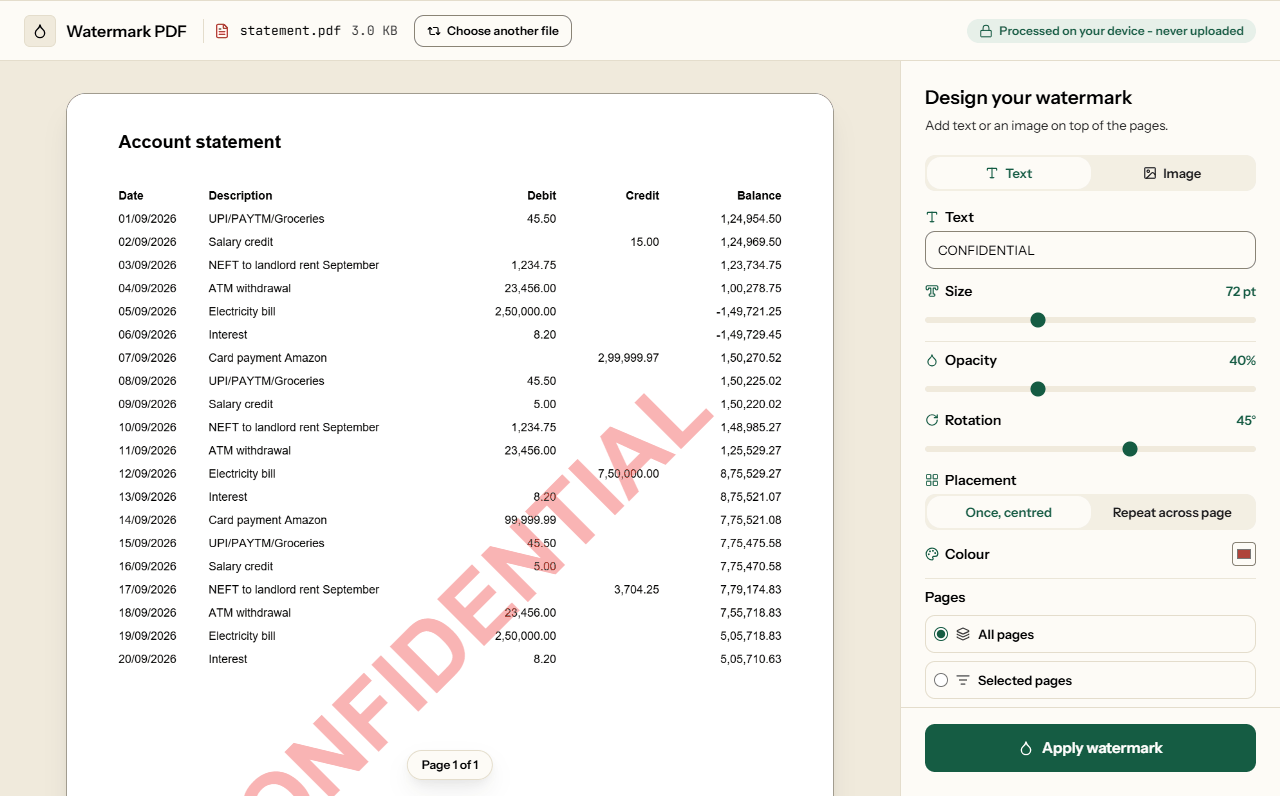
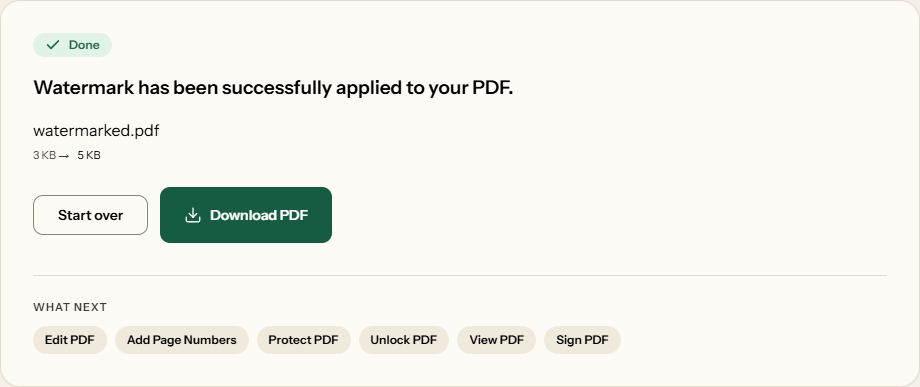
What Watermark PDF looks like
Two screens from the working tool, captured on 16 October 2026 with a one-page, 3 KB account statement in it.
Frequently asked questions
Can I watermark only some pages?
Yes. Choose Selected pages and type a list such as 1, or 1, 3, 5-7. Pages you leave out are copied unchanged, and the preview shows which pages will carry the mark before you apply it.
Can I repeat the watermark across the whole page?
Yes. Under Placement, choose Repeat across page. The mark is repeated along its own angle, in offset rows, to the edges of every page you picked. On our 100-page test file a tiled CONFIDENTIAL added 191 KB and took under half a second.
Can I write the watermark in Hindi or another language?
Yes. Latin, Greek and Cyrillic text is drawn as vector outlines. Hindi, Tamil, Bengali, Chinese and other scripts are drawn by your browser with your device's fonts, so letters join correctly, and placed as a sharp image. A Hindi mark added about 20 KB to our test file.
Will the watermark hide my text?
Not if you lower the opacity. It runs from 10% to fully solid, and every page previews the mark, so you can find the point where it shows clearly without getting in the way. Most documents read comfortably at 20 to 40%.
Will the watermark show up when someone searches or copies text?
No. The mark is drawn as shapes, not as text. In our test every page of the watermarked file returned exactly its original text, with no CONFIDENTIAL in it. Before 10 October 2026 the mark was text, and it turned up once on every page.
Can someone remove the watermark?
Not by switching off a layer or deleting comments: it is drawn into the page itself and prints with it. But a PDF editor that edits page content can select and delete it, so treat it as a deterrent. Add a password with Protect PDF if the file needs locking.
Does a watermark make the file bigger?
A little. On a 6-page report a single text mark added 3.4 KB, a tiled one 13.5 KB and a logo 11.8 KB. The mark is stored once and reused on every page, so 100 pages with one text mark each added only 24.7 KB.
Does the watermark land correctly on rotated or cropped pages?
Yes. We checked a page at each of the four rotations and a cropped page, and the mark landed where it should on every one, upright and inside the visible area.
Related Tools
Other ways to mark or secure a document.