Page numbers are the last thing most people think about and the first thing a reader notices when they are wrong. A stack of printed pages that restarts at 1 halfway through, or says "Page 3 of 3" on the third page of a thirty-page document, has to be fixed and printed again.
Almost every numbering mistake comes from one decision: whether you add the numbers before or after putting the document together. So on 29 September 2026 we ran both orders through our own Merge PDF and Add Page Numbers tools and read back what was printed on every page.
The short answer
- Merge first, number last. Numbering two chapters and then merging them printed "Page 1 of 3" to "Page 3 of 3", then started again at "Page 1 of 4". Merging first printed "Page 1 of 7" to "Page 7 of 7".
- Skip the cover, don't delete it. With one cover page skipped, the first numbered page says "Page 1", and the total counts only the numbered pages.
- Put the number at the bottom centre unless you have a reason not to. It is the one position that survives both binding and double-sided printing.
- Numbering costs almost nothing. It added 1,560 bytes to a six-page report.
What happens when you number first
We made two chapters, one of three pages and one of four, and gave every page a label saying which chapter and page it was. Then we numbered each chapter in the "Page 1 of 12" format and merged the results, and separately merged the chapters and then numbered the merged file.
Numbering first is worse than a restart. Each chapter only knows its own length when it is numbered, so every page of the first chapter says "of 3" and every page of the second says "of 4". A reader who sees "Page 3 of 3" assumes they have reached the end.
It also cannot be undone. The numbers are drawn into each page as text, not attached as a comment, which is why they print reliably, but it also means no tool will lift them back off. If you number too early, go back to the unnumbered files and start again. Keep them until the final version is printed.
The fix is to treat numbering as the last step: put the whole document together first, with Merge PDF for separate files and Organize PDF for the order, then number it once.
Covers, front matter and "Page X of Y"
A cover or title page is usually left unnumbered. Rather than removing it, tell the tool to skip it. With a one-page cover skipped in front of our seven pages, the cover had no number, the first chapter page said "Page 1 of 7", and the last said "Page 7 of 7". The total counts what is printed, not the pages in the file, so the numbers on the page still add up.
If a document continues another one, set the first number instead: a report whose first part ended on page 11 can start this part at 12.
Two schemes the tool does not do: Roman numerals for front matter (i, ii, iii) and Bates numbers, the prefixed codes such as ACME-000142 used for documents exchanged in legal cases. For either you need a desktop editor such as Adobe Acrobat Pro. For Roman front matter there is a workaround: number the body only, by skipping the front-matter pages.
Where to put the number
- Bottom centre is the safe default. It stays clear of a binding on either side, so it works for single-sided and double-sided printing alike.
- Bottom right suits single-sided documents bound or stapled on the left, because the number is at the edge you flip. Printed double-sided, the even pages' numbers land against the binding instead.
- Alternating corners, right on odd pages and left on even, is how books do it. Our tool puts the number in the same place on every page, so for that you need a layout program.
- Top is for documents that already have something in the footer, such as a letterhead or a disclaimer.
The size and margin are in points, the unit PDFs use: 72 points to an inch, about 28 to a centimetre. The default margin of 24 points puts the number 8.5 mm from the edge. Many office printers cannot print right up to the edge of the paper, so if a test page comes out with the number clipped, raise the margin. If a print shop will trim the pages after printing, ask them how far from the edge text has to be, and use at least that.
What numbering changes in the file
The numbers are real text, not a picture of text: we could search for "Page 5 of 7" in the numbered file and find it on page 5. They are set in Helvetica, a font every PDF reader has built in, so no font has to be added to the file. Numbering our six-page test report took it from 58,003 bytes to 59,563, an extra 1,560 bytes, or about 260 bytes a page.
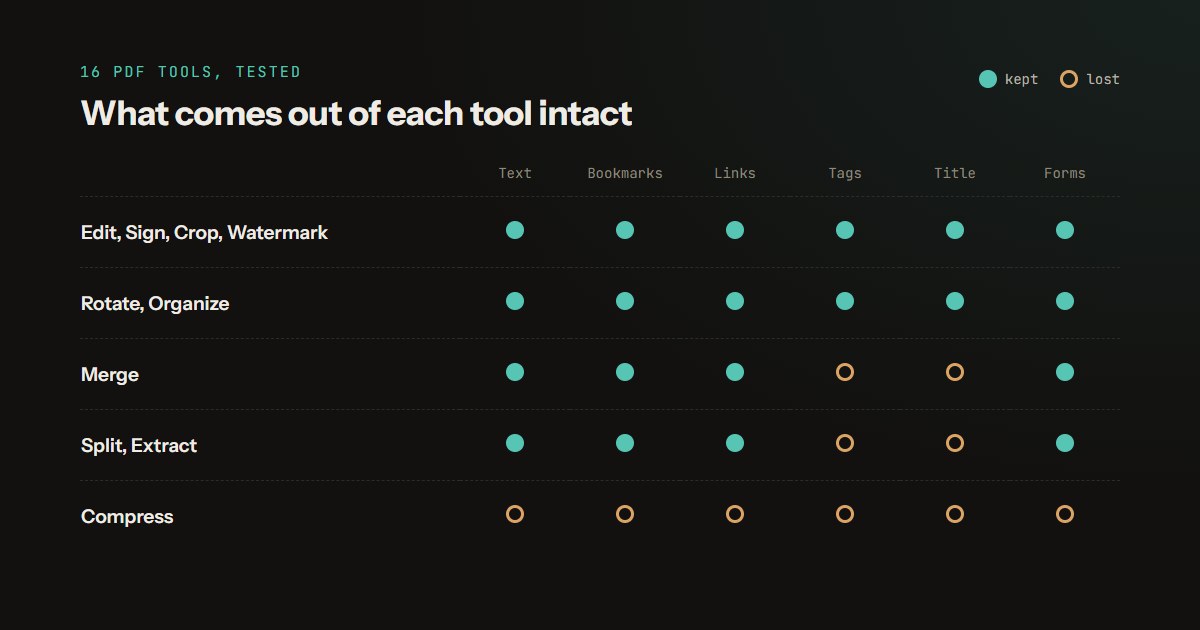
Nothing else in the document is touched. Bookmarks, links, form fields and accessibility tags all survived numbering in our test of every PDF tool, and it places the number correctly on rotated and cropped pages.
How to do it
- If the document is in several files, first merge the PDF files into one, and fix the page order.
- Open Add Page Numbers and add the finished file. Every page is shown with its number drawn where it will go.
- Choose the format and position. Set pages to skip for a cover, and the first number if the document continues another.
- Check the preview for any page where the number overlaps the footer, raise the margin if it does, then download. The file is numbered in your browser and is not uploaded.
How the test was built
Documents. Three PDFs made for the test with pdf-lib: a one-page cover, a three-page chapter and a four-page chapter, each page labelled with its chapter and page so the extracted text shows which page ended up where. File sizes were measured on the six-page report used in our survival test, a real export from Microsoft Edge's print-to-PDF.
Tools. Piqav's Merge PDF and Add Page Numbers did the work with their own code, unchanged, in Microsoft Edge on a development build of this site, in the "Page 1 of 12" format at the bottom centre with the default 24-point margin.
Checks. Every output page's text was extracted with pdf.js, the library the site uses to display PDFs, and the printed number read from it. Both orders are scripted, so they can be re-run whenever Merge PDF or Add Page Numbers changes.
Limitations. We tested the order of the steps, not printers: the advice on margins and binding is general and not measured on paper. The results describe the tools as they stood on 29 September 2026.