Most people searching for a way to compress a PDF are dealing with a problem that was created earlier, at the scanner. A 40-page contract has no business being 80 MB. It is that large because it was scanned at 600 DPI in full colour when 300 DPI in greyscale would have been indistinguishable in use and carried roughly a twelfth of the raw image data.
Compression can recover some of that. Scanning correctly in the first place avoids it entirely.
The arithmetic nobody mentions
DPI means dots per inch, measured along one edge. That single word "per inch" is doing a lot of work, because the page has two dimensions. Doubling DPI quadruples the pixel count.
An A4 page is 8.27 × 11.69 inches. So:
| Resolution | Pixel dimensions | Megapixels | Relative size | |---|---|---|---| | 150 DPI | 1,240 × 1,754 | 2.2 MP | 1× | | 300 DPI | 2,480 × 3,508 | 8.7 MP | 4× | | 600 DPI | 4,960 × 7,016 | 34.8 MP | 16× | | 1200 DPI | 9,921 × 14,031 | 139 MP | 64× |
Scanning at 600 instead of 300 does not make a file "a bit bigger". It quadruples the pixels on every page. JPEG compression squeezes some of that back out of the blank paper, so the file grows a little less: in our test, a page went from 175 KB to 489 KB on a clean page, 2.8 times, and from 2.4 MB to 9.4 MB on a rough copy, 4 times. Across a 200-page document, that is the difference between a file you can email and one you cannot.
Colour depth multiplies on top of this. The same page can be stored as:
- Bitonal (1-bit) - pure black and white, no grey. Smallest by an enormous margin.
- Greyscale (8-bit) - 256 shades. Roughly 8× a bitonal scan.
- Colour (24-bit) - full colour. Roughly 24× a bitonal scan, 3× greyscale.
A 600 DPI colour scan of a page of black text is carrying about 384 times the data of a 150 DPI bitonal scan of the same page, to convey exactly the same words.
150 vs 300 vs 600 DPI: what we measured
On 29 September 2026 we typed a paragraph from a tenancy agreement - with an amount, an account number, a reference and some dates in it - onto four A4 pages at 12, 10, 8 and 6 point, and "scanned" each page at 150, 200, 300 and 600 DPI in greyscale. Each scan was run twice: once clean, straight from the file, and once as a rough office copy, with a grey paper tint, a slight blur, a small skew and some grain. Then we ran every scan through our own OCR PDF tool and checked what it read against what we typed.


| DPI | 8 pt words | 8 pt numbers | 6 pt words | KB per page, clean / rough | OCR per page |
|---|---|---|---|---|---|
| 150 | 97.8% | 87.5% | 7.8% | 63 / 606 | 4.8 s |
| 200 | 100% | 100% | 11.1% | 95 / 1,068 | 7.7 s |
| 300 | 100% | 100% | 35.6% | 175 / 2,373 | 19.7 s |
| 600 | 100% | 100% | 30% | 489 / 9,385 | 142.6 s |
Four things stood out:
- Normal-sized text is not the problem. At 10 and 12 point, every word and every number was read correctly at every resolution, even on the rough copy.
- 150 DPI got a number wrong without warning. On the rough 8-point page it read the account number 20-44-91 as 20-44-01, and on the clean 6-point page it read the rent of 1,450 as 1.450. Both look plausible. That is the kind of mistake that matters, and at 200 DPI and above neither happened.
- 600 DPI bought nothing. It matched 300 DPI on everything that could be read, and on the rough 6-point page it did no better (30% of words against 36%). It cost up to four times the file size, and OCR took 143 seconds a page against 20.
- Tiny, rough print could not be saved by resolution. The rough 6-point page was mostly unreadable at every setting. What limited it was the blur and grain, not the pixel count.
What resolution actually buys you
Higher DPI is not wasted - it just has a ceiling past which it stops helping.
150 DPI is enough to read on a screen. Text is legible, but the edges are visibly soft when zoomed, and in our test OCR started getting small numbers wrong. Suitable for reference copies you will never print or process.
300 DPI is the practical standard, and the right default for almost everything. It is the minimum most OCR engines want for reliable recognition of normal body text, and it is the traditional threshold for acceptable print quality. If you scan everything at 300 and never think about it again, you will rarely be wrong.
600 DPI is usually sold as the answer for small type and poor originals. In our test it was not: on a rough 6-point page it read no more than 300 DPI did, because the blur and grain were the limit, not the pixel count. It can still help with a sharp original and genuinely tiny detail - engineering drawings, say - so if you need it, scan one page both ways and compare before doing a whole document.
1200 DPI and above is for reproduction and archival preservation of physical artefacts: photographs, artwork, historical documents where the material itself matters. For a page of text it is pure waste.
OCR has different requirements than reading
This trips people up. A scan that looks perfectly clear to you can still OCR badly, because OCR engines are sensitive to things your eye compensates for automatically.
A common rule of thumb is that OCR wants roughly 20 pixels of height per character to work reliably. At 300 DPI, 10-point text lands comfortably above that. At 150 DPI, the same text falls near the edge - and in our test, 150 DPI is where the numbers started going wrong, at 8 point and below.
But resolution is not the only factor, and often not the limiting one:
Contrast matters more than DPI. A crisp 300 DPI scan will out-perform a muddy 600 DPI one. Our rough 6-point page is the proof: doubling the resolution from 300 to 600 did not help at all. If your originals are faint, adjusting the scanner's threshold or contrast helps far more than raising resolution.
Skew is expensive. Pages fed at an angle cost accuracy disproportionately, because character segmentation assumes roughly horizontal baselines. Most scanning software can deskew automatically - turn it on.
JPEG artefacts confuse recognisers. Heavy JPEG compression creates ringing around high-contrast edges, which is exactly where letterforms live. For text you intend to OCR, use lossless or light compression at scan time and compress afterwards if needed.
Bitonal can beat greyscale. For clean printed text, a well-thresholded bitonal scan often OCRs better than greyscale, because the engine does not have to make the black/white decision itself. For faint or handwritten material the opposite is true - greyscale preserves the information the threshold would have thrown away.
A practical decision table
| What you are scanning | Resolution | Colour mode | |---|---|---| | Printed text you will read on screen | 200–300 DPI | Bitonal or greyscale | | Contracts, records for OCR and archive | 300 DPI | Greyscale | | Documents with photographs or colour charts | 300 DPI | Colour | | Small print, footnotes, dense tables | 300 DPI; compare one page at 600 | Greyscale | | Faded, damaged, or handwritten originals | 400–600 DPI | Greyscale | | Photographs and artwork | 600–1200 DPI | Colour | | Anything going to a government portal with a size cap | 200–300 DPI | Bitonal if text only |
Fixing what you already scanned
If the scans exist and rescanning is not realistic, you are compressing rather than preventing. That works, with limits.
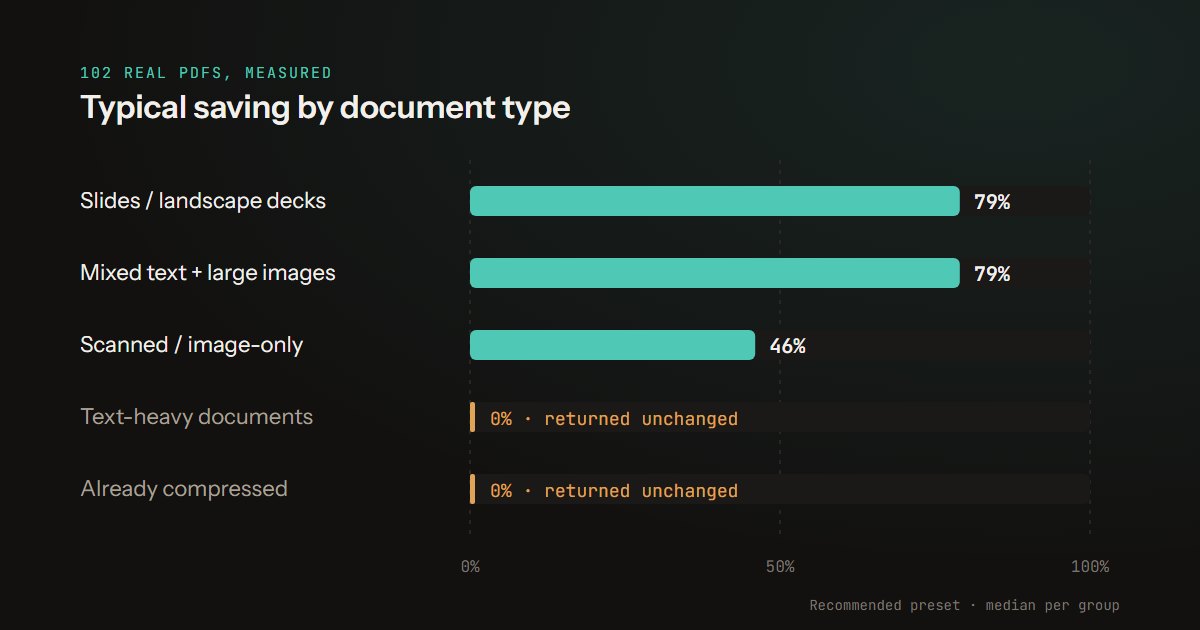
Downsampling a 600 DPI scan to 300 recovers most of the size and loses little you were using - the information was captured, you are simply storing less of it than the scanner produced. Our Compress PDF tool goes further than that: on its Recommended setting it redraws every page as a JPEG at about 108 DPI. Across 40 scanned documents in our compression benchmark, the typical saving was 46%, and the pages stop being searchable text - which is why getting the scan right in the first place beats compressing afterwards.
What you cannot do is recover detail that was never captured. A 150 DPI scan of small print will not OCR well no matter what you run it through, because the pixels that would distinguish an e from a c do not exist in the file. If accurate text extraction matters and the original is still available, rescanning at 300 DPI is faster than fighting a bad scan.
One thing worth doing before reaching for a compressor is to delete blank pages left by duplex scanners, which can each carry hundreds of kilobytes of scanned paper texture. Cropping wide margins does not help: a PDF crop hides the margin but keeps the full scanned image underneath, so the file stays the same size.
How the test was built
Pages. Four A4 pages made with pdf-lib, each carrying the same 90-word paragraph in Helvetica at 12, 10, 8 or 6 point. The paragraph contains eight figures: two amounts, an account number, a reference, a percentage and three periods of days or months.
Scans. Each page was rendered with pdf.js at 150, 200, 300 and 600 DPI, converted to greyscale and saved as a JPEG at quality 85, then packed into a PDF one page per image, the way a scanner saves one. The rough copy adds, before the greyscale step, a grey paper tint, a 0.09 mm blur (the same physical size at every resolution), a 0.6 degree rotation and random grain from a fixed seed. Both versions are simulations; neither went through a real scanner.
OCR. Piqav's OCR PDF read every scan in English, with the tool's own code, unchanged, in Microsoft Edge on a development build of this site. Words and numbers were scored by how many of the paragraph's own words and figures appeared in the OCR output exactly. Times are from one laptop and are only useful for comparing resolutions with each other. The scans and the scoring script are kept, so a new version of the OCR can be scored the same way.
Limitations. One paragraph, one font and one OCR engine, and scans that are simulated rather than made on paper: real scanners add their own sharpening and compression, and real originals have creases, stamps and handwriting. The file sizes of the rough copy depend heavily on how much grain there is, so read them as a comparison between resolutions, not as what your scanner will produce.
The short version
Scan at 300 DPI in greyscale unless you have a specific reason not to. Do not go below 200 if anyone will read numbers off the scan by OCR. Before raising it for small print or damaged originals, try one page at both settings; in our test, 600 DPI did not help. Drop to bitonal for clean printed text you need to keep small. And remember that the extra pixels from a 600 DPI colour scan are usually not buying you anything except a file you cannot email. If a scan is already too big to send, getting a PDF under an email limit is the next step.